
What Flint Does Differently

Flint is an experimental linter. It intentionally revisits many of the core design decisions from other popular web linters. Those design decisions generally fall into three categories:
- Architecture: how the core linter and its rules are structured and designed to be run
- Developer Experience: how rule authors will create rules that users experience
- Ecosystem: standardizing users and plugins around Flint, while still encouraging userland experimentation
See Introducing Flint for an overview of “hybrid linting” and Flint’s general experimental hypotheses. For a detailed breakdown of how Flint differs from other popular linters, read on!
Architecture
Section titled “Architecture”How the core linter and its rules are structured and designed to be run.
Hybrid Core
Section titled “Hybrid Core”Flint is a hybrid linter: its core is written in TypeScript, but language-specific plugins are free to use native-speed linting. We believe this will allow Flint to stay approachable, while still using native speed code to remove most of the traditional slow bottlenecks of web linting.
TypeScript for Type Awareness
Section titled “TypeScript for Type Awareness”Flint will use the typescript-go port for fast type-checking. This follows the same broad path as Oxlint’s type-aware linting.
An alternate strategy would have been Biome’s custom type inference engine. Flint’s hypothesis is that the cost of re-implementing and maintaining a type inference engine is long-term greater than that of integrating with typescript-go.
Type-Aware, Always
Section titled “Type-Aware, Always”Flint does not mark a distinction between type-aware rules vs. untyped rules. Any rule may use any sort of cross-file information such as types.
This is in contrast to typescript-eslint’s opt-in typed linting. Flint’s hypothesis is that the divide between untyped core rules and typed plugin rules is painful for the ecosystem:
- Core rules are less powerful than they could be
- Custom rules have to choose between being fast and easy to set up vs. slower and type-aware
- Even if the core architecture supported typed rules, it’d be extra work to make separate code paths
- Users now have to keep track of >=1 extra concept while configuring their linter
Given Flint’s hybrid core, typed linting should be significantly faster and much easier to set up than in ESLint. Removing typed linting’s downsides simplifies the linting story:
- Core rules don’t need to be duplicated by plugins to add in typed linting support
- Custom rules are simpler to write for not having to make decisions around types
- The core linter architecture can be optimized for type-checked linting performance
- Users no longer need to care about concepts like typed linting while configuring their linter
In building type awareness into the core runtime, Flint will by necessity also need to support stateful languages like TypeScript. This will solve the common “ESLint does not re-compute cross-file information on file changes” issue for editors.
Built-In TypeScript Support
Section titled “Built-In TypeScript Support”Flint provides TypeScript support out-of-the-box, the way Biome, Deno lint, Oxlint, and other recent linters all do. We believe there is a strong correlation between users who will want to lint their code and those whose projects are worth the overhead of TypeScript. By making TypeScript first-class in Flint -and even making the JS/TS plugin prioritize TS- we believe this makes for a smoother user experience for most users.
This is in contrast to ESLint, which delegates to typescript-eslint for TypeScript support. Although it is valuable to have a JavaScript-first linter in the ecosystem, Flint does not need to fill that space. Using a separate project for TypeScript support -let alone adding in concepts like “extension rules”- is confusing for users and inconvenient to work with for both maintainers and users.
Built-In TypeScript Extensibility
Section titled “Built-In TypeScript Extensibility”For many users, TypeScript is not the final “superset of JavaScript” language. Astro, Svelte, Vue, and other languages add to TypeScript syntax and can even completely replace it at times. However, no existing mainstream linter provides full API hooks for plugins to add their languages into TypeScript.
Flint provides full extensibility for TypeScript out-of-the-box.
Extension languages will be able to register themselves and patch Flint’s TypeScript language runtime as needed.
Flint’s Vue plugin, for example, will be able to support fully typed *.vue imports and JS expressions in <template>s by integrating the official Vue Language Tools with Flint’s Volar.js-powered TypeScript extensibility APIs.
Cross File Caching
Section titled “Cross File Caching”The ability to only run linting on impacted files after a small change should theoretically be a great performance win for linting. Most changes in real-world projects only impact a small set of files. However, lint result caching is unusable for many large users of linting today:
- ESLint’s cache does not support cross-file information such as types
- Native speed linters such as Biome and Oxlint run so quickly (prior to introducing typed linting) that a cache is not generally worthwhile
Flint allows languages to describe the dependents and dependencies of files, and appropriately invalidates caches on detected file changes. When a cache is present, Flint will only re-run lint rules on files that are changed since last run - and accounts for transitive dependency impacts.
Core Common Languages
Section titled “Core Common Languages”Building in TypeScript support is a great start, but linting is useful for more than just JavaScript and TypeScript. ESLint plugins exist for basically every language that web repositories use. We believe a modern web linter should encourage applying the same developer assistance and quality checks to all the languages in a project.
Flint additionally provides linting for JSON, Markdown, and YAML out-of-the-box. No additional plugins needed. Some other linters are already moving in this direction:
- Biome supports a plethora of frontend languages with YAML support planned
- ESLint: already provides
@eslint/jsonand@eslint/markdown
Flint’s core architecture is completely agnostic of any specific language. Each language provides its own parser, type information services, and any other language-specific hooks. Users are, of course, still able to write their own plugins for other languages.
Focused Language Plugins
Section titled “Focused Language Plugins”Flint will additionally provide first-party plugins for common languages: CSS, JSX, Vue, and so on.
These languages aren’t necessary for all users of Flint and so aren’t provided by the top-level flint package.
But, similar to the core common languages, they’re used by enough users to be prioritized. Flint aims to provide a consistent and high quality user experience for these languages by building them in the Flint project.
Formatting Coordination
Section titled “Formatting Coordination”Formatters are not linters. Two separate tools should be used for those two separate concerns. However, configuring two tools is cumbersome for users - especially given that the list of files you’d want to format is almost always roughly the same as the list of files to lint.
One of the biggest reasons users move to Biome is that it performs both formatting and linting with a single devDependency and configuration file.
In doing so, they provide a much easier setup and maintenance story, as well as sidestep many common ESLint misconfigurations that lead to performance issues.
Flint embraces the Biome approach of having one tool coordinate others. Flint will automatically run Prettier on linted files to format them after linting.
Language Reports Coordination
Section titled “Language Reports Coordination”As with formatting, most users generally run type checking on roughly the same set of files as linting. But most web projects that employ both linting and type checking run them separately in CI. Projects typically either run them in parallel across two workflows or in series within the same workflow. That’s inefficient and slow.
The root problem is that projects typically don’t connect the type information generated by type checking (tsc) to typed linting in ESLint.
Projects effectively run a full type-check twice: once with tsc and once with typed linting.
Flint will additionally re-use TypeScript information from typed linting to report type errors (“language reports”) on linted files.
This is the equivalent of Oxlint’s --type-check flag.
Embeddable by Design
Section titled “Embeddable by Design”In addition to running tools such as TypeScript within Flint, Flint will be made to be run as part of other tools. Its APIs will allow providing core primitives such as a virtual file system and existing TypeScript services. That way, Flint can be embeddable within other tools for other workflow styles.
Rich Cross File Fixes
Section titled “Rich Cross File Fixes”A linter is in many ways the best codemod platform for many kinds of migrations. It allows you to define a granular, testable set of migration rules, and then keep them enforced over time so developers don’t add regressions.
The “one file at a time” model of most of today’s linters doesn’t lend itself well to all the operations a codemod might need. Rules may need to make fixes or suggestions to files other than the one being linted.
Flint will provide a rich system for rule fixes and suggestions:
- The ability to indicate changes to files other than the one being linted
- Other file system operations, such as renames and permissions changes
- Targeting specific fixes and/or suggestions programmatically
Flint’s hypothesis is that providing rich fixes and suggestions will allow the linter to be used as a full codemod platform via deterministic lint rules.
Developer Experience
Section titled “Developer Experience”How rule authors will create rules that users experience.
Only Errors
Section titled “Only Errors”All mainstream web linters today allow configuring rules as errors or warnings:
- Errors are generally visualized with red squigglies and fail builds
- Warnings are generally visualized with yellow squigglies and don’t fail builds
Warnings are intended to be for transient indicators during migrations, for lower-impact reports, or when rules aren’t certain about issues. However, that delineation is often not worthwhile in practice:
- Warnings tend to live forever in codebases, which trains developers to ignore lint reports.
- Using the same red color and terminology for lint errors and type-checking errors is confusing.
- Some developers prefer VS Code’s
eslint.rules.customizationsto visualize lint errors with yellow squigglies, so as to not conflict with TypeScript’s red squigglies.
- Some developers prefer VS Code’s
- If a problem can’t be determined with certainty, it either should be suppressed using an inline config comment with an explanation, or not turned into a lint rule at all!
We believe warnings are a bad fit for the migration use case. Tools like eslint-nibble and ESLint’s new Bulk Suppressions provide a more comprehensive experience.
Flint does not allow changing rule report severities. All lint rule reports are treated as lint errors and will be visualized with the same non-red color -e.g. yellow or orange- squigglies in errors. Gradual onboardings of new rules or rule options are a separately managed feature akin to ESLint’s bulk suppressions.
Comprehensive Rule Reports
Section titled “Comprehensive Rule Reports”Rule reports are the entry point for most developers who experience a linter. The little red or yellow squiggly in an editor that shows rule text on hover is how developers learn about the report.
If that message includes too little text, people won’t understand the report. Too much text, and they won’t read any of it. Many rules’ reports have too much conceptual complexity or too many important nuances to fit in a brief hover message.
Linters today generally provide two pieces of information with reports:
- ID/name, linked to the rule’s online documentation
- Text description of the rule report
Oxlint reports may additionally provide:
- Additional contextual text to explain the report
- Related spans to highlight in the CLI
Flint leans into Oxlint-style detailed rule reports. Its rules include rich metadata explaining the details of rule reports. Flint’s CLI will display the appropriate amount of information depending on how it is being run.
Interactive and Watch CLI Modes
Section titled “Interactive and Watch CLI Modes”Linter CLIs can be run in drastically different use cases.
When you have a lot of tooling complaints in many files, it can be useful to get a full list of them on the CLI. It can also be useful to update that list of reports as you fix them.
Alternately, if you’re focusing on fixing a tricky rule report, it can be helpful to have rich detailed output for the report in question. You might want to only have one file’s worth of reports at a time, though, to not be overwhelmed with many reports.
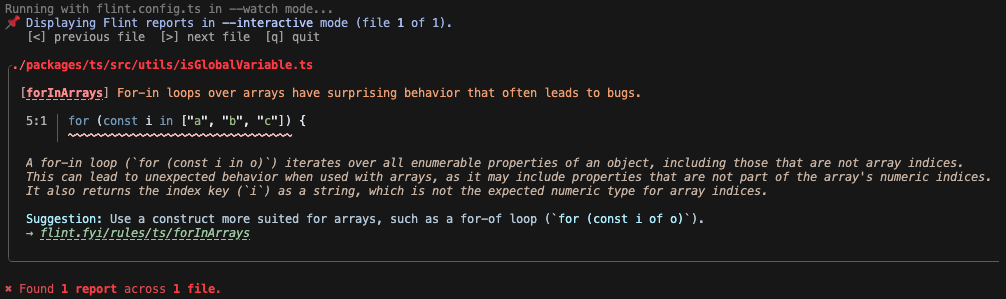
Flint provides two CLI flags modifiers:
--interactive: to provide a user-controllable focused view of one report at a time--watch: re-lints files as they change, similar totsc --watch
Those two flags can be combined as needed depending on how the user is running Flint. For example, when running in CI you would likely want neither flag. Using both flags locally would provide a nice focused view on one lint report at a time:
Comprehensive Rule Documentation
Section titled “Comprehensive Rule Documentation”The next step for many developers who receive a lint report is the rule’s documentation page. The docs sites for most linters today standardize some level of the following information for rules:
- High-level ID/name and description
- High-level metadata, such as which config(s) include the rule and whether it requires type information
- Longer description of the rule
- Examples of configuring the rule, as well as its options if they exist
- When not to use the rule
- Links to the rule’s source code, test code, and any related other documentation
Flint’s documentation standardizes all of those points on each of its docs pages. Its internal tooling will enforce those sections all be filled out for each rule. Flint will also provide tooling that will allow third-party plugin websites to do the same.
Standardized Rule Metadata
Section titled “Standardized Rule Metadata”Users like naming and stylistic standardization. Without consistent patterns, it becomes much more difficult to remember how things work consistently. Rule names, option names, option value defaults, and other strings users need to think of when using a linter are easier to remember when they’re consistent.
Unfortunately, no mainstream linter today is consistent with its choices — even internally. Community plugins often make very different and inconsistent choices as well. This lack of standardization is painful for users.
Flint standardizes the following common metadata points for all its provided plugins and rules…
Standardized Plugin Categories
Section titled “Standardized Plugin Categories”From a technical perspective, lint rules can generally be split into the following three categories:
- Formatting: Rules that don’t change the AST (not implemented in Flint)
- Stylistic: Rules that change the AST but don’t change code logic
- Logical: Rules that change code logic
Those categories are useful for surfacing to developers why a rule would -or wouldn’t- be useful. Many developers also treat reports differently based on which category they fall into.
Flint’s core plugins separate their primary suggested presets into logical and stylistic.
Third-party plugins are encouraged -but not required- to use those categories as well.
That split between logical and stylistic allows developers to react to the metadata in their own tooling.
For example, developers might want to use an equivalent of eslint.rules.customizations to downgrade stylistic rules to blue info squigglies instead of yellow in the future planned Flint VS Code extension:
{ "linter.rules.customizations": [ { "category": "stylistic", "severity": "info" } ]}Standardized Rule Messages
Section titled “Standardized Rule Messages”The text of rule messages in mainstream linters today is often inconsistent across rules, even within the same linter or plugin. Older rules tend to have assertive and curt messages, such as:
no-console:Unexpected console statement.no-empty:Empty block statement.
Newer or more recently updated rule messages tend to be more descriptive and speak to the actual problems the rules detect, such as:
no-loss-of-precision:This number literal will lose precision at runtime.no-useless-assignment:This assigned value is not used in subsequent statements.
In practice, users don’t generally react well to curt messages. They can feel like the linter is saying that something is absolutely wrong, even though most lint rules are sometimes wrong. There’s a reason why many linters put “When Not To Use” sections in their rule documentation pages.
All rule messages in the Flint project will have consistent phrasing describing the actual problem(s) being reported. Rules will attempt to never be curt or overly prescriptive about what the user “should” do.
Standardized Rule Names
Section titled “Standardized Rule Names”Rule names have to make several choices:
- Abbreviation:
- Abbreviated:
no-cond-assign,no-const-assign/ noConstAssign - Unabbreviated:
no-constant-binary-expression/ noConstantBinaryExpression
- Abbreviated:
- Prefixes:
- Definitive:
@typescript-eslint/ban-ts-comment,no-await-in-loop - Loose:
@typescript-eslint/restrict-plus-operands,prefer-const - No prefix:
array-callback-return,constructor-super
- Definitive:
- Singularity:
- Singular:
default-case-last,for-direction - Plural:
no-magic-numbers,require-atomic-updates
- Singular:
Inconsistent answers to each of those choices lead to user confusion:
- Abbreviation:
- Memorizing many abbreviations is annoying at best and confusing at worst
- Some words abbreviate to different meanings, such as “constant” and “const”
- Prefixes:
- Alphabetical sorting of rules places them similarly prefixed rules together, weirdly
- Many rules have dropped their prefix after adding an option to invert behavior
- Singularity: just one character difference can be particularly difficult to memorize
In Flint, core rule names will attempt to make one choice for each of those naming options:
- Abbreviation: no abbreviation, so users won’t have to memorize dozens of abbreviations
- Prefixes: no prefixes; the rules would be named for the behavior or syntax they target
- Singularity: always plural, as that’s how one would describe what rules target
Flint reworks names to be consistent and fully typed out. Here are some reworked names from Flint’s TypeScript plugin:
| Current Rule Name | Reworked Rule Name |
|---|---|
| array-callback-return | arrayCallbackReturns |
| ban-ts-comment | typescriptCommentDirectives |
| constructor-super | constructorSuper |
| default-case-last | defaultCaseLast |
| for-direction | forLoopDirections |
| no-await-in-loop | loopAwaits |
| no-cond-assign | conditionalAssignments |
| no-const-assign | constAssignments |
| no-constant-binary-expression | constantBinaryExpressions |
| no-floating-promises | floatingPromises |
| no-magic-numbers | magicNumbers |
| prefer-const | constVariables |
| require-atomic-updates | atomicUpdates |
| restrict-plus-operands | plusOperands |
Flint also includes the rule name as a required field in its metadata (unlike ESLint). That way, downstream tooling such as documentation generators and unit testers can rely on it.
Standardized Rule Options
Section titled “Standardized Rule Options”Rule options have to make an even broader, deeper set of choices:
- Format:
- Array:
array-type,no-restricted-component-names - Object with keys for option names: …almost all other rules
- Array:
- Name:
- Plurality:
- Singular:
no-implicit-coercion>boolean - Plural:
no-floating-promises>checkThenables
- Singular:
- Prefix:
- Turning off checks:
allow*:getter-return>allowImplicitignore*:no-trailing-spaces>ignoreCommentsskip*:no-trailing-spaces>skipBlankLines
- Turning on checks:
check*:prevent-abbreviations>checkPropertiesenforce*:accessor-pairs>enforceForClassMembersinclude*:no-duplicate-imports>includeExportsrequire*:arrow-parens>requireForBlockBody
- Turning off checks:
- Plurality:
- Value defaults:
- Boolean values:
- Off-by-default:
no-floating-promises>ignoreIIFE - On-by-default:
no-floating-promises>ignoreVoid
- Off-by-default:
- Multi-values:
- Empty by default:
no-floating-promises>allowForKnownSafeCalls - Starting set:
restrict-template-expressions>allow
- Empty by default:
- Boolean values:
What a list!
Flint’s rules attempt to set a convention of making the same choice consistently for their options:
- Format: an object with keys for option names
- Name:
- Plurality: always plural, as that’s how one would describe what rule options target
- Prefix:
allow*for options that add in an array of valuescheck*for options that turn on a checkignore*for options that turn off a check
- Value defaults:
- Boolean values: off-by-default, for simpler truthiness concepts
- Multi-values: empty by default, so specifying values doesn’t remove defaults
- If a value is important to include by default, it should be hardcoded on
Here are some rule options from Flint’s TypeScript plugin:
| Current Name | Reworked Name | Current Default | Reworked Default |
|---|---|---|---|
(array-type) | style | 'array' | (same) |
(no-restricted-component-names) | names | [] | (same) |
allow | (same) | [{ ... }] | [] |
allowForKnownSafeCalls | (same) | [] | (same) |
allowImplicit | ignoreImplicit | false | (same) |
boolean | booleans | true | false |
checkProperties | (same) | false | (same) |
checkThenables | (same) | false | (same) |
enforceForClassMembers | ignoreClassMembers | true | false |
ignoreComments | (same) | false | (same) |
ignoreIIFE | (same) | false | (same) |
ignoreVoid | (same) | true | false |
includeExports | checkExports | false | (same) |
requireForBlockBody | checkBlockBodies | false | (same) |
skipBlankLines | ignoreBlankLines | false | (same) |
Flint will also sort rule options alphabetically in their docs pages. Users should be able to O(log(N)) scan a docs page for a rule option. Not O(n) search through some arbitrary order.
Standardized Specifiers
Section titled “Standardized Specifiers”Some rules allow specifying types or values in their options.
For example, @typescript-eslint/no-restricted-types allows specifying types in its types option:
{ "@typescript-eslint/no-restricted-types": [ "error", { "types": { "SomeType": "Don't use SomeType because it is unsafe." } } ]}The problem with using plain strings to target names is that they are ambiguous.
In the example, any type named SomeType would be restricted, even if it is a different type than the one the user intended.
Over in typescript-eslint, we developed a TypeOrValueSpecifier format for specifying types or values in options.
It allows users to specify not just the name but also the source -global, package, etc.- of a type or value.
Here’s how that would look for specifying SomeType from a specific file:
{ "@typescript-eslint/no-restricted-types": [ "error", { "types": [ { "message": "Don't use SomeType because it is unsafe.", "type": { "from": "file", "name": "SomeType", "path": "./src/legacy-types.ts" } } ] } ]}Rules implemented in the Flint project will only ever use the TypeOrValueSpecifier format to specify types or values.
Plugins will be strongly encouraged to use the format instead of ambiguous strings.
Typed Rules and Options
Section titled “Typed Rules and Options”One of the biggest points of user pain with all linter configuration systems today is that rules and their options are not type-checked. They’re only validated at runtime. Mainstream linters today have you specify rules as properties of an object, where their string key is their plugin name and rule name, and their value is their severity and any options:
{ "my-plugin/some-rule": ["error", { "option": "..." }]}Those string keys have no associated types in config files.
Linters themselves can validate rule options, such as ESLint’s options schemas, but those don’t translate to TypeScript types.
You don’t get editor intellisense while authoring; instead, you have to use @eslint/config-inspector or run your config to know whether you’ve mistyped the name of a rule or an option.
Flint’s rules will take a more modern approach. They will allow Standard Schema descriptions for rule options, which enables the use of TypeScript-friendly schema validation libraries such as Zod:
import { typescriptLanguage } from "@flint/typescript-language";import { z } from "zod";
export const someRule = typescriptLanguage.createRule({ options: { option: z.string(), }, setup(context) { // ... },});import { defineConfig, ts } from "flint";import { someRule } from "./src/rules/someRule.ts";
export default defineConfig({ use: [ { files: ts.files.all, rules: [ someRule({ option: "Hooray!", }), ], }, ],});As a result, Flint’s configurations are fully typed. Users receive IntelliSense as they type plugin rules, and all those settings can be type checked. Config values can additionally be verified at runtime by the schema validation library.
Typed Plugin Settings
Section titled “Typed Plugin Settings”An even less type-safe part of many current linters’ config systems is the shared settings object.
You can put whatever you want in there, and any plugin may read from it.
In theory, cross-plugin shared settings can be used for related plugins, while plugin-specific settings are by convention namespaced under their name. In practice, there are approximately zero plugins in common use that share settings with each other.
Flint will also allow plugins to define their own settings with Standard Schema types. They will be type-safe and validated similarly to plugin rules.
Typed Configuration Files
Section titled “Typed Configuration Files”Flint’s hypothesis for configuration files is that it’s possible to have a full JavaScript configuration system without confusing users over subtle edge cases. Flint’s configs will be fully type-safe (including lint rules and their options) and will support workspace configurations. Parsing, processing, and other edge case hazards will be handled for users behind-the-scenes.
Inline Snapshot Unit Tests
Section titled “Inline Snapshot Unit Tests”ESLint’s RuleTester (and typescript-eslint’s RuleTester extension) provide APIs for clear, succinct descriptions of many isolated test cases at once.
They’re a step forward from the old TSLint *.ts.lint test files that put all test cases into one big file namespace.
However, they do come with downsides around their errors array format:
- It doesn’t show the full error message, just the data used to create it
- Not managing long messages is nice, but text formatting issues can more easily sneak in
- Specifying location data as 0-4 of
column,endColumn,line, and/orendLine:- Adding new cases and updating tests for rule changes is cumbersome
- Tests tend to be inconsistent about how much location data they include
Flint will provide:
- A
RuleTesterequivalent that defines rule reports in an inline string snapshot - First-party plugins for at least Vitest that auto-fix report snapshots to match the current rule reports
Here’s an example of Flint’s RuleTester in practice:
import rule from "./forInArrays.ts";import { ruleTester } from "./ruleTester.ts";
ruleTester.describe(rule, {  invalid: [    {      code: `declare const array: string[];for (const i in array) {}`,      snapshot: `declare const array: string[];for (const i in array) {}^^^^^^^^^^^^^^^^^^^^^^For-in loops over arrays have surprising behavior that often leads to bugs.`,    },  ],  valid: [    `declare const array: string[];for (const i of array) {}`,  ],});
Ecosystem
Section titled “Ecosystem”Standardizing users and plugins around Flint, while still encouraging userland experimentation.
Shared Glossary
Section titled “Shared Glossary”Many important linting terms have inconsistent usage or even definitions in the wild today. For example, “stylistic” can alternately refer to:
- Stylistic (Rule): The category of lint rules that enforce formatting, naming conventions, or consistent usage of equivalent syntaxes
- ESLint Stylistic: The plugin that ESLint’s formatting rules were migrated to, along with some non-formatting stylistic rules
- typescript-eslint’s stylistic shared configs, which enforce consistent usage of equivalent syntaxes, as well as general TypeScript best practices that don’t impact program logic
Other ambiguous terms include:
- “Config”: a shared config, or a configuration file?
- “Format”: formatting rules, or a formatter like Prettier, or code to prints ESLint reports?
This is hard to keep straight even for people who work on linters. Now imagine how confusing this all is for someone new to linting, and/or who doesn’t care much about their linter.
Flint continues the ESLint Glossary work by defining single recommended terms for all the shared linting concepts. You can find the Flint glossary on Glossary. It includes definitions for common linting terms as well as what other common linters use in comparison.
Common Core Rules
Section titled “Common Core Rules”Flint’s approach for plugins is that all rules which apply to a super-majority of users of the linter should be built in the core project. In doing so, the plugins both become more easily discoverable and will have a much more consistent look and feel for users.
To support that larger effort, the Flint project:
- Establishes three tiers of project plugins:
- “Core”: Plugins applicable to any project using their language (JavaScript/TypeScript, JSON, Markdown, YAML)
- “Focused”: Plugins for larger projects or styles that are applicable to many (but not all) likely Flint users
- “Incubator”: Area-specific plugins that should eventually exist under community governance
- Keeps a list of over 1,000 popular lint rules for reference, with rules categorized into Flint’s plugins
Flint’s hypothesis for plugins is that by taking that comprehensive, holistic approach, users of Flint will be able to easily turn on more comprehensive, powerful linting by default - without needing to deep dive into the plugin ecosystem. You can find the full list of plugins and rules in Rules.
Community Organization
Section titled “Community Organization”The ESLint Community organization is wonderful. It serves a great need for housing high-applicability, high-value community projects that are not able to be part of ESLint core. It’s a kind of “next step” for finding plugins outside of ESLint core — not quite “first party”, and not an external “third party”.
Flint will lean into having an equivalent community organization. That organization would have guidelines for inclusion, including:
- Actively supporting new core linter minor versions soon after release
- Adherence to the shared linting glossary
- Documenting all configs, rules, and rule options
- Timely (re-)triaging of issues and pull requests
- Numerous consuming projects and weekly downloads
- Not being specific to any one userland metaframework
- Providing metadata alongside the
package.jsonsuch as:- Names of any dependencies the plugin is directly for (e.g.
"lodash","react") - Text of when to use the plugin and each of its configs
- Names of any dependencies the plugin is directly for (e.g.
Many of Flint’s “incubator” plugins are intended to eventually grow into those community projects.
Plugin Registry
Section titled “Plugin Registry”A linter’s ecosystem will always include a fair share of third-party plugins. Finding the right third-party linter plugins for a project today is a pain. ESLint does not yet have a centralized listing or one canonical approach users should take. Power users of ESLint often follow a strategy like:
- Search dustinspecker/awesome-eslint for plugins that seem relevant to the project
- For each dependency the project relies upon, search online for “eslint plugin” and that dependency name
That’s a slow, unreliable process. Determining which plugins are popular or still actively maintained is time-consuming.
The Flint project will create a centralized plugin registry of popular userland plugins. It will have similar guidelines for inclusion as the community organization, but with more lenient numbers, and allowing framework-specific plugins. The registry will automatically update plugin metadata such as:
- How recently the plugin was updated
- How many open issues exist that haven’t been interacted with by a maintainer
- The latest version of the linter that the plugin formally supports
Plugins that get too out-of-date on any of those metrics will be marked as such in the UI. That will allow users to filter and search for plugins that are, say, actively maintained and support the latest version of the linter.
The registry will be exposed to users in two ways:
- API: allowing tooling to be built using known plugin metadata, such as…
- Website: allowing users to search on that metadata
Essentially, this will be a tailored npm for linter plugins.
Config Initializer
Section titled “Config Initializer”Every mainstream linter comes with some kind of configuration file initialization CLI: @eslint/config, biome init, oxlint --init, etc.
Good!
Initialization CLIs help users get started quickly and with confidence their configuration is correct.
Flint will build on these existing initializers by using plugin data from the centralized plugin registry to make the setup experience dynamic. When run in a project with existing dependencies, it will offer to add the plugins for those dependencies into the created configuration. It will also offer the user an input to provide dependency names they want to search on plugins for.
It will use a templating system like Bingo’s Stratum so plugins can define how they add to a config file.
Compatibility Layers
Section titled “Compatibility Layers”Although Flint is building in most popular existing lint rules into its core project, many users have their own custom ESLint plugins and rules. Flint will need to provide a compatibility layer that will allow you to use those plugins and rules natively via a Flint configuration file.
ESLint’s compatibility utilities and eslint-plugin-tslint are good references of prior art for compatibility layers.
Configuration Migration
Section titled “Configuration Migration”Flint will also provide and recommend using an automated migrator that converts configs in other linters to their closest canonical equivalent in Flint.
ESLint configurations in particular tend to be more complex than other linters’ because ESLint requires configuring edge cases such as parser and plugin options. However, we believe most users configure ESLint in relatively common, straightforward ways. The Flint configuration migrator will create “best effort” configurations that capture the perceived intent of existing configurations.
Flint’s configuration migrator will also provide flags for whether to adopt practices recommended by the new linter:
- Adding any plugins from the plugin registry relevant to existing project dependencies
- Enabling the linter’s gradual onboardings system for rules previously set to warn
- If formatting rules were used, remove them and instead coordinate a formatter
- Using the recommended configs from the linter and any enabled plugins
Those flags will allow the migration tool to be used as more than just a single-shot utility. The migrator will also help users migrate to best practices and more powerful linter configurations.
ESLint’s configuration migrator and tslint-to-eslint-config are a good references of prior art for migration tooling.
Next Steps
Section titled “Next Steps”As of January 2026, Flint is still an early-stage prototype. Many but not all of the features in this post have not yet been built.
If you’re interested in helping build out a new experimental linter, we’d love to have you join us. At the very least, see About for how to get started using Flint as a user. Trying out the project and telling us about your experience on the Flint Discord would be immensely helpful.
The GitHub issue tracker is where you can find our list of upcoming work. See our Contributing guide for how to find issues that you can get started on. Feel free to ask for help if you’re new and unsure. We’re happy to assist you.
Supporting Flint Financially
Section titled “Supporting Flint Financially”Flint can receive donations on its Open Collective. Your financial support will allow us to pay our volunteer contributors and maintainers to tackle more Flint work. As thanks, we’ll put you under a sponsors list on the flint.fyi homepage.
Further Reading
Section titled “Further Reading”The points in this post are reframed equivalents to the original thought experiments by Josh Goldberg: